Visio org chart, without the drawing work
You were about to draw an org chart in Visio. Build it in OrgChartDesk in minutes instead. A report is added in one click, the layout arranges itself, and the chart looks ready to present. Share it as a live link or export a slide. When your company needs the Visio file, Export hands you one.
Build the chart in four steps
- Add the people. Select a card and click Add report, and the new person lands under their manager. You can also start from a template, or import a spreadsheet and let the Manager column draw the reporting lines. The layout arranges itself, so there are no boxes to line up.
- Shape it. Drag a card onto a new manager, add a dotted line for a second boss, group a team in a department box and give the chart a title.
- Make it presentable. Give each department its color, add photos and pick a theme. Ten themes designed for org charts come with Pro and the trial.
- Share it or export it. Send one live link that anyone can open with no account, or export a PDF, a PowerPoint slide or an image. If someone needs the Visio file, click Visio in the same Export window.
Why build it here
When your company needs the Visio file
Open Export and click Visio. The .vsdx file opens in Visio with a box for every person, the name and title as text, the reporting lines, dotted lines with their labels, department boxes and the chart title.
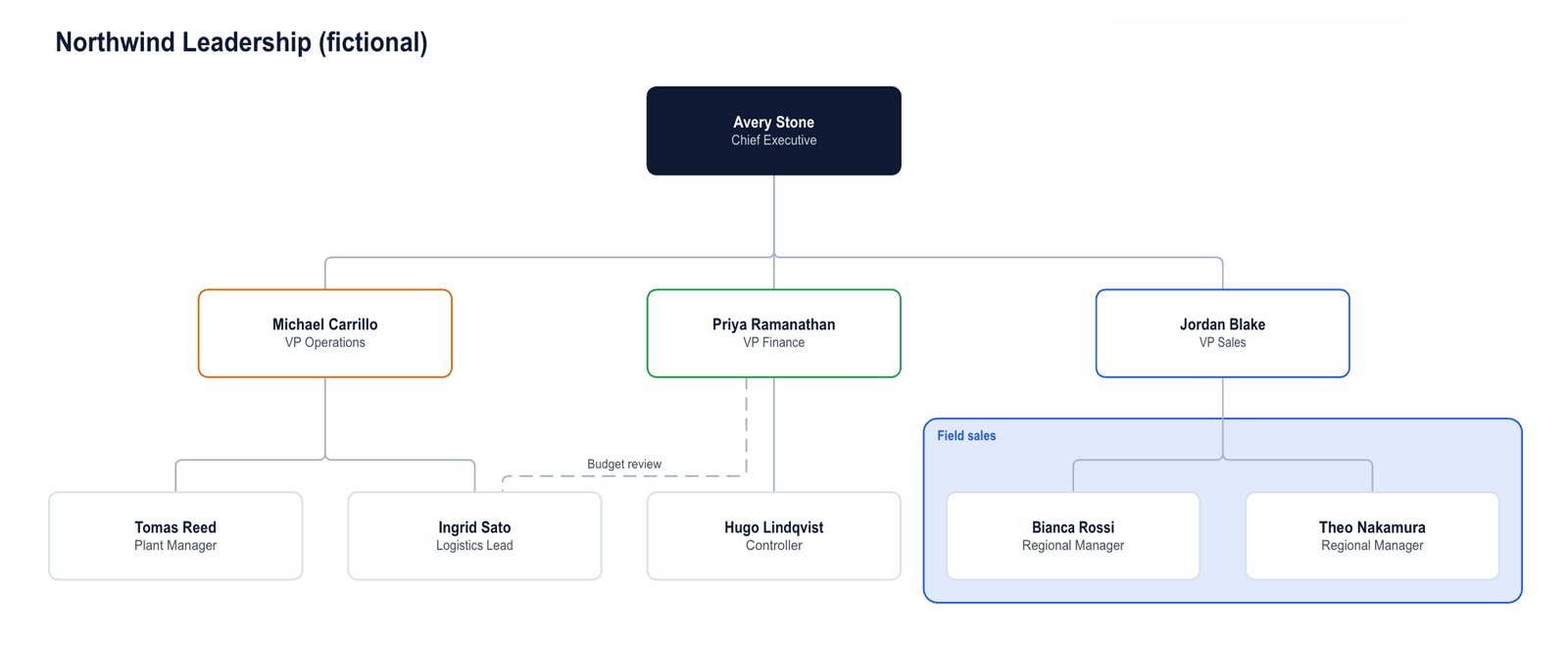
Each export has its job. The Visio file carries the structure of the chart for a colleague who works in Visio. The chart exactly as you styled it, with photos and themes, goes out as PDF or PowerPoint from the same window.
Already have a Visio org chart?
Open the Import & data tab, click Import, choose Import CSV / Excel / Visio and pick the .vsdx file. People, titles and reporting lines come across, and a vacancy shape becomes an open role, so nobody redraws the chart. From there you restyle it with a theme and share it as one live link.
An older .vsd file needs one step first. Open it in Visio and save it as .vsdx.
Starting from Excel
If the people are in a spreadsheet, import the file here and the Manager column draws the reporting lines from names, work emails or employee IDs. The import runs in the browser on any computer, Mac included, and on the free plan your first spreadsheet import builds the whole chart. In Visio, as of November 2026, the Organization Chart Wizard that builds a chart from a spreadsheet is part of the Windows desktop app, which comes with Visio Plan 2 and the standalone editions.
Which plan includes what
The free plan holds one editable chart, with no card. Add people by hand up to 15, or let your first spreadsheet import build the whole chart, at any size. A Visio file counts as that import, and a live share link is included. PDF, PowerPoint and Visio exports are part of Pro, at $19 a month for one editor or $15.83 a month billed annually, and of Team. The 7-day trial includes them and needs no card.
Common questions
How do I make an org chart in Visio?
In Visio you drag shapes from a stencil and connect them, or you run the Organization Chart Wizard in the Windows desktop app. In OrgChartDesk you add a report in one click and the layout arranges itself. Export has a Visio button for when you need the file.
Can OrgChartDesk open a Visio org chart?
Yes. Import a .vsdx file and the people, titles and reporting lines come across. A vacancy shape becomes an open role. A file in the older .vsd format needs to be saved as .vsdx in Visio first.
What does the Visio file carry?
A box for every person with the name and title as text, the reporting lines, dotted lines with their labels, department boxes and the chart title. For the chart exactly as you styled it, with photos and themes, export PDF or PowerPoint from the same window.
Do I need a Visio org chart template?
No. Start from an OrgChartDesk template or a blank chart, and the layout arranges itself as you add people.
Do I need Visio installed?
No. OrgChartDesk runs in any modern browser, so you build the chart on a Mac, a Windows PC or a Chromebook.
Which plan includes Visio export?
Pro, at $19 a month for one editor or $15.83 a month billed annually, and Team. The 7-day trial includes it and needs no card.